
You’re working 55-hour weeks and still behind on orders. You installed three automation apps last month. You’re more overwhelmed than before.
Here’s what nobody tells solo founders: automation without diagnosis amplifies chaos. You can’t fix leaks you haven’t found.
This is the audit. 47 points across 7 operations areas. Score each one. Find where your hours actually go. Then—and only then—systematize.
The Symptom: You’re Solving the Wrong Problems
Solo founders waste 15-20 hours weekly on tasks that could be automated or eliminated. But here’s the pattern I see repeatedly: they automate what’s visible, not what’s expensive.
You automate email confirmations (already fast) while manually reconciling inventory (eating 4 hours weekly). You build a fancy order tagging workflow while copy-pasting shipping addresses into spreadsheets.
The result: you feel productive. You’re still drowning.
The hidden cost isn’t the task. It’s the accumulation.
That 7-minute inventory check three times a day? 21 minutes daily. 2.5 hours weekly. 10 hours monthly. 120 hours yearly.
One small leak. 120 hours.
Now multiply across every operations area. Orders, inventory, fulfillment, returns, customer service, marketing, finance. Each area has 5-10 potential leaks.
When I finally audited my own operation, the number was ugly: I was spending close to 14 hours a week on tasks that had nothing to do with growing the store — order tagging, inventory reconciliation, chasing shipping exceptions. After mapping where the time actually went, I cut it to about 5. The nine hours I got back weren’t in the tasks I thought were the problem; they were hiding in the small repetitive ones I’d stopped noticing.
The Diagnosis: Why Time Audits Fail
Most time audits tell you to “track your day.” You try it for 72 hours, hate it, stop.
The problem: tracking everything captures nothing actionable. You need a framework that surfaces severity, not just activity.
This audit works differently:
- Area-based, not time-based. You audit operations systems, not random moments.
- Severity-scored. Each leak gets a cost estimate so you prioritize correctly.
- Action-oriented. Every checkpoint leads to a fix—manual process, tool, or elimination.
The goal isn’t perfect data. It’s finding the 3-5 leaks costing you the most hours.
The System: 47-Point Solo Store Operations Audit

Work through each section. Score every item honestly. Don’t skip areas because “they’re fine”—the expensive leaks hide in areas you’ve normalized.
Scoring guide:
- 0 = Not applicable or already automated
- 1 = Minor leak (<30 min/week)
- 2 = Moderate leak (30-60 min/week)
- 3 = Severe leak (1-3 hours/week)
- 4 = Critical leak (3+ hours/week)
Section 1: Order Processing (7 points)
How orders move from customer click to fulfillment queue.
| # | Checkpoint | Your Score |
|---|---|---|
| 1 | Manually reviewing every order before fulfillment (fraud check that could be rule-based) | __ /4 |
| 2 | Copy-pasting order details into fulfillment software or spreadsheets | __ /4 |
| 3 | Manually tagging orders for priority, wholesale, or special handling | __ /4 |
| 4 | Checking inventory availability after order comes in (vs. real-time sync) | __ /4 |
| 5 | Manually sending order confirmations or customizing templates per order | __ /4 |
| 6 | Handling pre-orders, backorders, or partial fulfillment manually | __ /4 |
| 7 | Manually applying discounts or adjustments to orders | __ /4 |
Section total: __ /28
What high scores mean:
- Scores 15+: Your order flow has structural problems. Consider automation tools for order processing.
- Scores 8-14: Targeted fixes needed. Identify the 2 highest-scoring items.
- Scores 0-7: Order processing is relatively efficient.
Section 2: Inventory Management (7 points)
How you track, sync, and replenish stock.
| # | Checkpoint | Your Score |
|---|---|---|
| 8 | Manually counting or reconciling inventory (vs. system-generated counts) | __ /4 |
| 9 | Updating inventory across multiple sales channels manually | __ /4 |
| 10 | No low-stock alerts—you discover stockouts when customers can’t buy | __ /4 |
| 11 | Manually calculating reorder points or safety stock levels | __ /4 |
| 12 | Spreadsheet-based inventory tracking alongside your store platform | __ /4 |
| 13 | No dead stock flagging—old inventory sits unnoticed | __ /4 |
| 14 | Manual SKU or barcode management for new products | __ /4 |
Section total: __ /28
What high scores mean:
- Scores 15+: Inventory is your biggest time sink. Multichannel sync should be priority #1.
- Scores 8-14: Moderate inefficiency. Focus on low-stock alerts and reorder automation.
- Scores 0-7: Inventory management is under control.
Section 3: Fulfillment & Shipping (7 points)
How orders get packed and shipped.
| # | Checkpoint | Your Score |
|---|---|---|
| 15 | Manually generating shipping labels (vs. batch printing) | __ /4 |
| 16 | Comparing carrier rates manually for each order | __ /4 |
| 17 | Copy-pasting tracking numbers into orders or emails | __ /4 |
| 18 | No packing slip automation—handwriting or manual template fill | __ /4 |
| 19 | Manually notifying customers of shipment (vs. auto-trigger) | __ /4 |
| 20 | Handling address validation manually (catching typos, incomplete addresses) | __ /4 |
| 21 | Printing/organizing orders for pick-pack without pick lists | __ /4 |
Section total: __ /28
What high scores mean:
- Scores 15+: Fulfillment is where your days disappear. Shipping software ROI is immediate.
- Scores 8-14: Key bottlenecks exist. Prioritize label batching and tracking automation.
- Scores 0-7: Shipping operations are streamlined.
Section 4: Returns & Exchanges (7 points)
How returns flow from request to resolution. (For a deep dive, see the Solo Store Returns Audit.)
| # | Checkpoint | Your Score |
|---|---|---|
| 22 | Manually approving every return request | __ /4 |
| 23 | No self-service return portal—customers email for returns | __ /4 |
| 24 | Manually generating return labels | __ /4 |
| 25 | Updating inventory manually when returns arrive | __ /4 |
| 26 | Processing refunds one-by-one (vs. rule-based auto-refund) | __ /4 |
| 27 | No exchange automation—handling swaps manually | __ /4 |
| 28 | Manually tracking return reasons (no data for product improvement) | __ /4 |
Section total: __ /28
What high scores mean:
- Scores 15+: Returns are costing you $10+ per return in hidden labor. Automate eligibility-checking.
- Scores 8-14: Specific leaks exist. Self-service portal has highest impact.
- Scores 0-7: Return process is efficient.
Section 5: Customer Communication (6 points)
How you handle support, updates, and proactive messaging.
| # | Checkpoint | Your Score |
|---|---|---|
| 29 | Manually responding to “where is my order” messages | __ /4 |
| 30 | No automated shipping updates—customers ask because they don’t know | __ /4 |
| 31 | Copy-pasting templated responses (vs. saved replies or macros) | __ /4 |
| 32 | Manually flagging VIP customers or repeat buyers for special handling | __ /4 |
| 33 | No FAQ or help center—answering same questions repeatedly | __ /4 |
| 34 | Managing support across multiple channels without unified inbox | __ /4 |
Section total: __ /24
What high scores mean:
- Scores 12+: Customer communication is reactive and repetitive. FAQ + shipping notifications first.
- Scores 6-11: Targeted improvements needed. Focus on WISMO (where-is-my-order) elimination.
- Scores 0-5: Communication flow is efficient.
Section 6: Marketing & Content (7 points)
How you create, schedule, and track marketing activities.
| # | Checkpoint | Your Score |
|---|---|---|
| 35 | Manually sending marketing emails (vs. automated sequences) | __ /4 |
| 36 | No abandoned cart recovery—leaving revenue on the table | __ /4 |
| 37 | Manually posting to social media (vs. scheduling) | __ /4 |
| 38 | Creating product listings from scratch for each channel | __ /4 |
| 39 | No post-purchase review request automation | __ /4 |
| 40 | Manually segmenting customer lists for campaigns | __ /4 |
| 41 | Pulling marketing reports manually (vs. automated dashboards) | __ /4 |
Section total: __ /28
What high scores mean:
- Scores 15+: Marketing is manual and inconsistent. Automated email sequences have fastest ROI.
- Scores 8-14: Key automations missing. Prioritize abandoned cart and review requests.
- Scores 0-7: Marketing automation is solid.
Section 7: Finance & Reporting (6 points)
How money flows and gets tracked.
| # | Checkpoint | Your Score |
|---|---|---|
| 42 | Manually exporting sales data to accounting software | __ /4 |
| 43 | Reconciling payments manually (Shopify + PayPal + other gateways) | __ /4 |
| 44 | No automated tax calculation or reporting | __ /4 |
| 45 | Manually tracking expenses and COGS per product | __ /4 |
| 46 | Creating financial reports manually (vs. automated) | __ /4 |
| 47 | No profit-per-order visibility—guessing at margins | __ /4 |
Section total: __ /24
What high scores mean:
- Scores 12+: Financial blind spots are dangerous. Accounting integration is essential.
- Scores 6-11: Targeted improvements. Focus on sales-to-accounting sync.
- Scores 0-5: Financial operations are tracked.
The Scorecard: Find Your Priority Areas
Add up your section totals:
| Section | Max Score | Your Score | Priority Level |
|---|---|---|---|
| Order Processing | 28 | __ | Score >14 = High |
| Inventory Management | 28 | __ | Score >14 = High |
| Fulfillment & Shipping | 28 | __ | Score >14 = High |
| Returns & Exchanges | 28 | __ | Score >14 = High |
| Customer Communication | 24 | __ | Score >12 = High |
| Marketing & Content | 28 | __ | Score >14 = High |
| Finance & Reporting | 24 | __ | Score >12 = High |
| Total | 188 | __ |
Interpreting your total:
- 0-40: Your operations are tight. Focus on optimization, not overhaul.
- 41-80: Moderate leaks across multiple areas. Prioritize top 2-3 sections.
- 81-120: Significant time loss. You’re likely working 10-15 extra hours weekly on manual ops.
- 121+: Critical. Operations are holding your business hostage. Immediate action required.
My own first audit scored 61 out of 94. The two sections that dragged me down: inventory sync (I was manually reconciling stock across two sales channels, a guaranteed oversell waiting to happen) and returns processing (no automation at all, every return handled by hand). Those two alone accounted for most of the wasted hours — which told me exactly where to spend my first automation dollar.
The Action Plan: What to Do With Your Scores
You’ve found the leaks. Now fix them in order.
Step 1: Identify your top 3 scoring items across all sections.
These aren’t the “most interesting” to fix—they’re the most expensive. A score-4 item costs you 3+ hours weekly. That’s 150+ hours yearly. Start there.
Step 2: Classify each top item.
- Eliminate: Can you stop doing this entirely? Some processes exist because “we’ve always done it.”
- Simplify: Can you reduce steps without a tool? Documentation and checklists sometimes beat software.
- Automate: Is there a tool that handles this? Match tool cost against hours saved.
Step 3: Sequence your fixes.
Don’t try to fix everything simultaneously. Fix one leak, stabilize it, then move to the next.
The priority matrix:
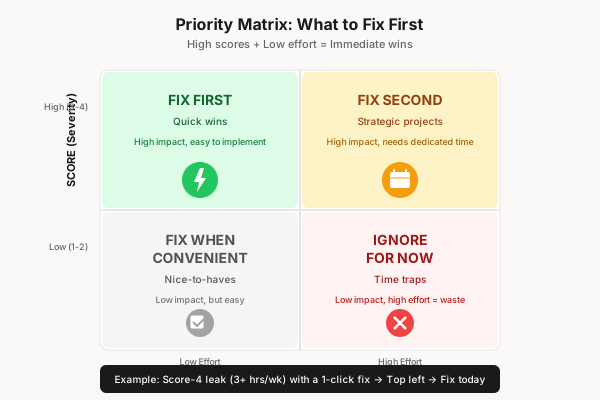
Quick wins with high scores get fixed immediately. Complex fixes with high scores go in the backlog for dedicated time.
Step 4: Re-audit in 30 days.
Leaks shift. What you fix may surface new ones. Monthly audits (faster after the first) keep operations tight.
The Checklist: Solo Store Operations Audit Summary
Print this. Run it monthly. Track your total score over time.
Order Processing
- Orders processed without manual review
- No copy-pasting between systems
- Automatic tagging for priority/special handling
- Real-time inventory check at order
- Automated confirmations
- Pre-order/backorder handling systematized
- Discount/adjustment rules automated
Inventory Management
- System-generated counts, not manual
- Multi-channel sync automated
- Low-stock alerts active
- Automated reorder triggers
- No parallel spreadsheet tracking
- Dead stock flagging enabled
- SKU/barcode creation systematized
Fulfillment & Shipping
- Batch label printing
- Automated rate comparison
- Tracking auto-synced to orders
- Auto-generated packing slips
- Shipment notifications automated
- Address validation automated
- Pick lists generated automatically
Returns & Exchanges
- Rule-based return approval
- Self-service portal live
- Automated return labels
- Inventory auto-updates on return receipt
- Auto-refund for qualifying returns
- Exchange automation active
- Return reason tracking for insights
Customer Communication
- WISMO eliminated with proactive updates
- Shipping notifications automated
- Saved replies/macros for common questions
- VIP flagging automated
- FAQ/help center live
- Unified inbox for all channels
Marketing & Content
- Email sequences automated
- Abandoned cart recovery active
- Social media scheduled
- Product listings templated/syndicated
- Review requests automated
- Customer segmentation automated
- Marketing dashboards auto-generated
Finance & Reporting
- Sales data auto-synced to accounting
- Payment reconciliation automated
- Tax calculation automated
- Expense/COGS tracking per product
- Financial reports automated
- Profit-per-order visibility enabled
The Verdict: Audit Before You Automate
The expensive mistake isn’t choosing the wrong automation tool. It’s automating before you know what’s broken.
This audit takes 30-45 minutes the first time. Subsequent runs take 10-15 minutes. That investment surfaces 5-20 hours of weekly time leaks.
You can’t buy that insight. No tool gives it to you. No consultant can diagnose it without this data.
Run the audit. Score your reality. Fix what’s actually expensive.
The stores that scale aren’t the ones with the most tools. They’re the ones that know exactly where their time goes—and where it shouldn’t.
Want the full 47-point checklist as a printable PDF? Get the free Solo Store Operations Audit — score your own operation in 20 minutes and find exactly where your time is leaking.
Already know your biggest leak is automation tooling? Start with the Shopify Flow vs MESA vs Alloy decision framework to pick the right tool for your stack. Or if returns are killing you, run the Solo Store Returns Audit as a focused deep-dive.