
You’re adding a new product. Size, Color, Material. Three options. Done.
Then the customer asks: “Can I get this monogrammed?”
You try to add a fourth option. Shopify says no. Three options maximum. That’s the ceiling.
You’re not hitting the 2,000-variant limit everyone warns about. You’re hitting the wall nobody talks about—the 3-option-per-product ceiling that blocks customization before variant math ever becomes a problem.
The Symptom: You Need a Fourth Dimension
The 2,048 variant cap gets all the press. It sounds dramatic. But here’s what actually blocks solo stores:
You can only have three option types per product.
Size + Color + Material = full. No room for:
- Fit (Regular, Slim, Relaxed)
- Personalization (Monogram, Engraving, None)
- Bundle configuration (With Case, Without Case)
- Length variations for the same style
- Gift options (Wrapped, Standard)
The math isn’t the problem. A product with 5 sizes × 4 colors × 3 materials = 60 variants. Nowhere near 2,048. But add a fourth dimension? Shopify won’t let you.
This ceiling hits stores selling:
- Apparel with fit + size + color + length
- Jewelry with size + metal + stone + engraving
- Home goods with size + color + material + personalization
- Any product with customization options beyond three attributes
On our store, configurable products are the classic case. A single model can need finish (three options), size (three options), and mounting hardware (two options) — three option types that fill Shopify’s ceiling before you’ve even added compatibility as a fourth axis.
The Diagnosis: Why Shopify Built This Wall
Shopify’s variant architecture was designed for simple retail. Three options cover most standard products:
- T-shirt: Size, Color, Sleeve Length
- Sneakers: Size, Color, Width
- Phone case: Model, Color, Material
The constraint isn’t technical laziness. It’s database design. Each variant is a separate SKU with inventory tracking, pricing, images, and fulfillment data. More option dimensions multiply complexity exponentially.
But Shopify never anticipated the customization economy.
Personalized products—monogramming, engraving, custom text—became a growth category. Shoppers expect configurability. Solo stores selling customizable goods hit the 3-option wall constantly.
The cost of this mismatch:
- Lost sales. You can’t offer what customers want to buy.
- Manual workarounds. You create “pseudo-products” or handle options via order notes.
- Fulfillment errors. When options live in notes instead of variants, pickers miss details.
- Inventory chaos. You can’t track stock accurately for configurations that don’t exist as variants.
A merchant in the Shopify Community put it directly: “The 3-option ceiling is the real limit. I’ll never get close to 2,048 variants—I just need a fourth option for personalization.”
The System: Three Workaround Tiers
Not all solutions fit all stores. This decision depends on your product complexity, technical comfort, and budget.
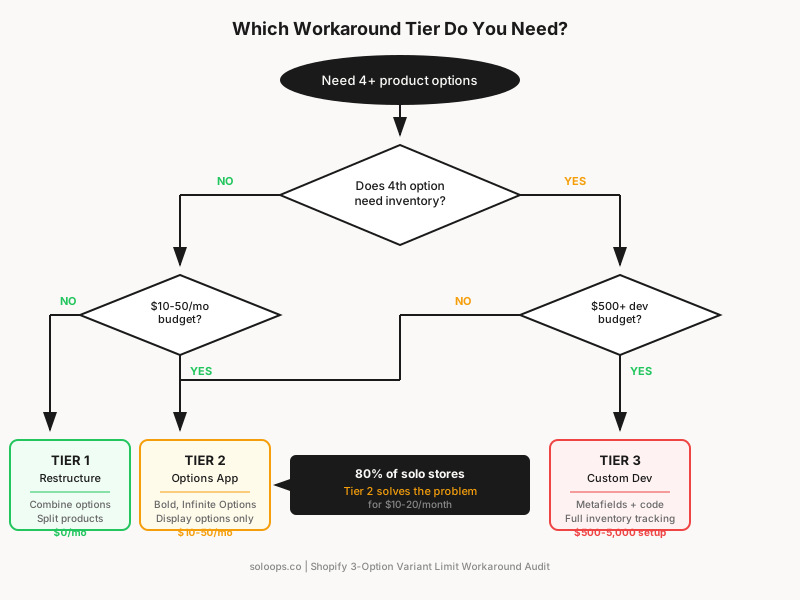
Tier 1: Product Restructuring (Free, No Apps)
Before adding tools, ask: can you restructure the product to work within three options?
Strategy A: Combine options.
Instead of Size + Color + Material + Fit, combine related attributes:
- “Blue Cotton / Regular Fit” becomes one option value
- “Blue Cotton / Slim Fit” becomes another
You’re trading option clarity for option availability. Works when customers understand the combined naming.
Strategy B: Split into multiple products.
Create separate product listings:
- “Classic T-Shirt (Regular Fit)” — Size, Color, Material
- “Classic T-Shirt (Slim Fit)” — Size, Color, Material
You lose the single-product experience but gain full option flexibility per listing.
Strategy C: Use line item properties for non-inventory options.
Personalization text (monograms, engravings) doesn’t need inventory tracking. You can capture it via line item properties—custom fields that attach to the cart item without being variants.
This requires theme code modification or a customization app, but the product stays within Shopify’s variant system.
When Tier 1 works:
- Your fourth option doesn’t affect inventory (personalization, gift wrapping)
- Customers will understand combined option names
- You’re okay with multiple product listings for the same core item
When Tier 1 fails:
- You need inventory tracking on the fourth dimension
- Combined names become confusing (“Blue Cotton Regular Fit XL” is hard to scan)
- You have too many products to split manually
Tier 2: Product Options Apps ($15-50/month)
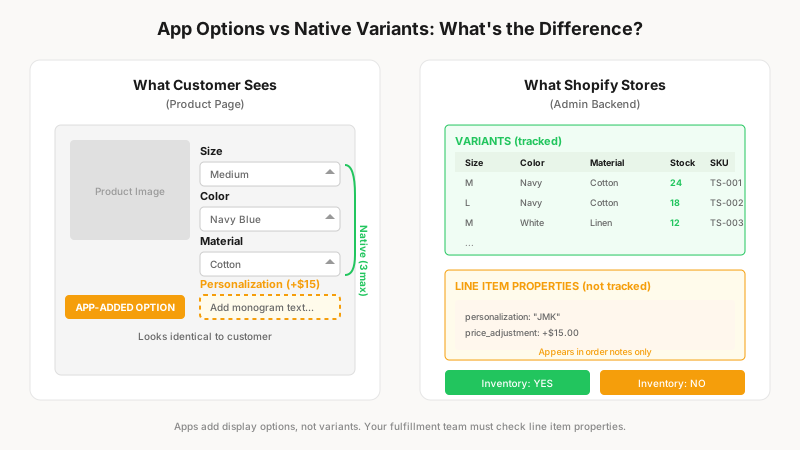
Apps extend Shopify’s native options without changing the underlying variant structure.
How they work:
The product stays at 3 options (or fewer) in Shopify’s backend. The app adds a layer on top—custom option fields displayed to the customer. When orders come in, the extra options appear as line item properties or order notes.
Top options apps for solo stores:
| App | Starting Price | Best For |
|---|---|---|
| Infinite Options | $9.99/month | Simple add-ons, no conditional logic needed |
| Bold Product Options | $19.99/month | Conditional options, pricing adjustments |
| Globo Product Options | Free-$19.99/month | Budget-conscious, basic needs |
| Hulk Product Options | $10/month | Mid-range features, good support |
What apps solve:
- Unlimited option fields (not variants—display fields)
- Conditional logic (“show engraving option only for gold metal”)
- Price adjustments per option (“add $15 for monogram”)
- File uploads (for custom artwork)
What apps don’t solve:
- Inventory tracking per option combination
- Variant-level images for the fourth option
- True SKU-based fulfillment routing
The critical distinction: Apps add display options, not variants. Your fulfillment team sees the extra options in order notes or line item properties—but Shopify’s inventory system doesn’t track them.
Tier 3: Metafields + Custom Development ($500-5,000 setup)
For stores where the fourth option affects inventory, pricing, or fulfillment routing, you need a structural solution.
Metafields approach:
Shopify metafields store additional product data—including custom option configurations. Combined with custom theme code or a headless frontend, you can build:
- Option selectors that pull from metafield data
- Inventory tracking via linked products or external systems
- Dynamic pricing based on selected configuration
When this makes sense:
- Your fourth option must affect inventory (different components per configuration)
- You need variant-level images for non-standard options
- Your order volume justifies the development cost
- You’re planning a theme rebuild anyway
When this is overkill:
- Your fourth option is personalization-only (text, engraving)
- You process fewer than 500 orders/month
- You’re not technical and don’t have dev budget
The build-vs-buy calculation:
A custom metafields solution costs $500-5,000 to build (freelancer rates). At $30/month for an options app, you’d need 17-166 months (1.5-14 years) to break even on development cost.
Unless you have specific inventory-tracking requirements that apps can’t meet, Tier 2 apps are more practical for solo stores.
The Decision Checklist
Use this to pick your workaround tier.
Choose Tier 1 (Restructuring) if:
- Your fourth option doesn’t need inventory tracking
- You have fewer than 20 affected products
- Combined option names stay readable
- You’re comfortable editing theme code for line item properties
- Budget is zero
Choose Tier 2 (Options App) if:
- You need unlimited display options beyond three
- The fourth option affects price (add-ons, upgrades)
- You want conditional logic (“show X only when Y selected”)
- Inventory tracking per extra option is NOT required
- $10-50/month fits your budget
Choose Tier 3 (Metafields/Custom) if:
- Your fourth option requires inventory tracking
- You need variant-level images for extra options
- Order volume exceeds 500/month
- You have development budget ($500+)
- You’re already planning theme or architecture changes
The 80/20 answer: Most solo stores hitting the 3-option ceiling should use a Tier 2 app. Bold Product Options or Infinite Options solve 80% of use cases for $10-20/month.
The Audit: Which Products Are Blocked?
Before implementing any workaround, audit your catalog.
Step 1: List products that need 4+ options.
For each product, note:
- Current options (3 max)
- The missing option you need
- Whether the missing option affects inventory
- Current workaround (if any—order notes, separate listings)
Step 2: Quantify the cost.
For each blocked product:
- Estimated sales lost because you can’t offer full configuration
- Time spent on manual workarounds per week
- Fulfillment errors from options in notes (returns, remakes)
Step 3: Prioritize by impact.
| Product | Missing Option | Affects Inventory? | Weekly Time Lost | Est. Lost Sales |
|---|---|---|---|---|
| [Product A] | Personalization | No | 2 hrs | $500/mo |
| [Product B] | Fit | Yes | 1 hr | $200/mo |
| [Product C] | Bundle Config | Yes | 30 min | $100/mo |
Products with high lost sales + no inventory requirement = immediate Tier 2 candidates. Products with inventory requirements = evaluate Tier 3 ROI.
| Product type | Missing option | Inventory-tracked? | Our workaround |
|---|---|---|---|
| Configurable SKU A | 4th axis (accessory style) | Yes | Split products + linked-variant app |
| Configurable SKU B | Mount type beyond 3 options | Yes | Separate SKUs grouped by tag |
| Configurable SKU C | Finish + compatibility combo | Yes | Metafields for the extra axis |
The Implementation: Bold Product Options Setup
For the majority of solo stores, here’s the 30-minute setup path.
1. Install Bold Product Options (or comparable app)
Connect to your store. The app integrates with your existing theme automatically.
2. Create an option set
- Name your new option (e.g., “Personalization”)
- Choose input type (text field, dropdown, checkbox)
- Set pricing if applicable (“Add $15 for engraving”)
- Configure conditional rules if needed
3. Assign to products
Apply the option set to individual products or entire collections.
4. Test the customer experience
- Add product to cart with custom options
- Verify options appear in cart and checkout
- Place test order
- Confirm options appear in order admin and fulfillment
5. Update fulfillment workflow
Make sure your packing process checks line item properties—not just variant names. This is where errors happen: pickers look at variant info and miss the custom text in properties.
The Verdict: The 3-Option Limit Is Manageable
Shopify’s variant architecture isn’t changing. The 3-option ceiling is structural. But it’s not a business-stopper—it’s a design constraint with established workarounds.
If your fourth option is personalization (monogram, engraving, custom text): use line item properties or a $10-20/month options app. Setup takes under an hour. Problem solved.
If your fourth option needs inventory tracking: you have a harder decision. Either restructure products into multiple listings, or invest in metafields development. Run the numbers—most solo stores don’t have the volume to justify custom development.
If you’re designing new products: design around the constraint. Three inventory-tracked options maximum. Additional customization via line item properties. It’s not ideal, but it’s reality.
The stores that scale aren’t the ones without constraints. They’re the ones that know exactly which constraints matter—and which ones have cheap workarounds.
You just found a cheap workaround.
This diagnostic is part of the Solo Store Operations Audit—47 checkpoints to find where your store leaks time. If your operations bottleneck is automation tooling, not product architecture, start with the Shopify Flow vs MESA vs Alloy decision framework.